
Reservations: A Simpler Way to Give Guests Access Across Multiple Days
Most access schedules follow a pattern.

Monday through Friday.
9:00 AM to 5:00 PM.
Every Tuesday evening.
Weekends from 8:00 AM to noon.
That’s what Nexkey’s recurring schedules were built to handle.
Then customers started asking for something different.
They didn’t want access that repeated every day.
They wanted to give someone access from a specific check-in time to a specific check-out time, even when that access crossed multiple days.
That feedback led to Reservations.
What is the Reservations feature in Nexkey?
Reservations lets you give a guest continuous access from a defined check-in date and time through a defined check-out date and time.
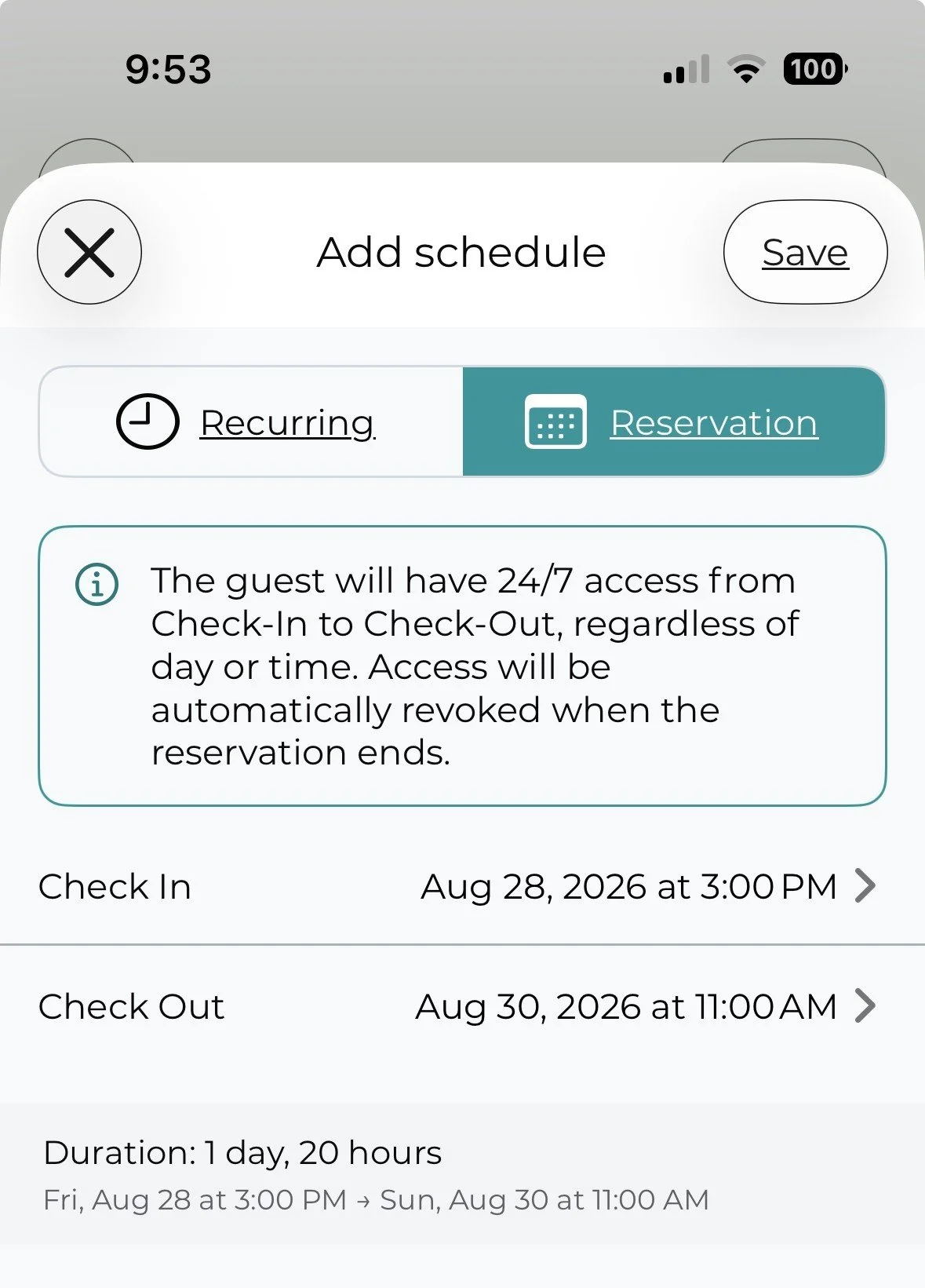
During that window, the guest has 24/7 access..
When the reservation ends, access is automatically revoked
For example:
Check in Friday at 3:00 PM
Keep access through the entire weekend
Check out Sunday at 11:00 AM
Access ends automatically at 11:00 AM Sunday
No daily schedule to build.
No need to create separate access periods for Friday, Saturday, and Sunday.
No need to remember to remove access afterward.
You set the reservation once.
Nexkey handles the rest.
Recurring schedules and reservations solve different problems
Our original scheduling feature is still the right choice for predictable access.
Think about an employee who works Monday through Friday from 9:00 AM to 5:00 PM.
That schedule repeats.
A reservation doesn’t.
A reservation is built around a beginning and an end.
That small difference matters.
A contractor may need access from Tuesday afternoon through Thursday morning.
A guest may arrive Friday and leave Sunday.
A temporary worker may need unrestricted access for three days.
An event organizer may need access from setup through teardown.
Trying to force those situations into a recurring schedule creates unnecessary work.
Reservations gives you a schedule that matches the way temporary access actually works.
This feature came from customers, not a feature checklist
We could add a lot more features to Nexkey.
We choose not to.
That’s intentional.
Installers and customers regularly send us ideas. Some are interesting. Some sound useful. Some would probably look good on a feature comparison chart.
That doesn’t mean they belong in the app.
Every new feature adds something else a user has to understand.
Another button.
Another menu.
Another setting.
Another opportunity to make something simple feel complicated.
We turn down plenty of nice-to-have ideas because we want Nexkey to stay easy to use.
Reservations was different.
We heard a real access problem from the people using Nexkey.
Our existing recurring schedules handled repeating access well, but they didn’t handle continuous access across multiple days in the way customers expected.
There was a clear gap.
So we built the feature around that problem.
A real-world example
Imagine you manage a coworking space.
A guest books a conference room and office space from Monday at 10:00 AM through Wednesday at 3:00 PM.
With a recurring schedule, you might have to think through separate daily access periods.
What should happen Monday night?
What about early Tuesday morning?
Does the guest need to regain access each day?
With Reservations, those questions disappear.
You choose:
Check In: Monday at 10:00 AM
Check Out: Wednesday at 3:00 PM
The guest can access the space throughout the reservation.
At 3:00 PM Wednesday, their access ends.
That’s much closer to how you already think about a reservation.
Where reservation-based access makes sense
We expect this feature to be useful anywhere access is temporary but needs to remain active across days.
That can include:
Coworking spaces
Short-term office rentals
Churches hosting outside groups
Event spaces
Contractors working multi-day projects
Property managers
Temporary staff
Vendors
Guests
Shared business spaces
The use cases are different, but the access question is the same.
“When should this person get access, and when should that access stop?”
Reservations lets you answer that with two dates.
Automatic access removal matters too
Giving someone access is usually the easy part.
Remembering to remove it later is where problems start.
A guest leaves.
A contractor finishes the job.
An event ends.
Someone assumes another person removed the access.
Nobody does.
Reservations removes that extra step.
When the check-out time arrives, access ends automatically.
That makes temporary access easier to manage and reduces the chance that old permissions stay active longer than intended.
Why we care about keeping Nexkey simple
Access control software can become complicated quickly.
There’s always another setting that could be added.
Another permission level.
Another workflow.
Another configuration screen.
We don’t want Nexkey to become software you need training just to operate.
Our goal is much simpler.
You should be able to open the app, understand what you’re looking at, and get the job done.
That means every feature has to earn its place.
Reservations earned its place because customers and installers showed us a real problem that our existing scheduling tools didn’t fully solve.
We listened.
Then we built the smallest, clearest solution we could.
Frequently asked questions about Nexkey Reservations
What is a reservation access schedule?
A reservation access schedule gives someone continuous access between a specific check-in date and time and a specific check-out date and time.
How is a reservation different from a recurring access schedule?
A recurring schedule repeats on certain days or times, such as Monday through Friday from 9:00 AM to 5:00 PM.
A reservation has one defined start and end point and can provide continuous access across multiple days.
Does access work overnight during a reservation?
Yes. The guest has 24/7 access between the selected check-in and check-out times.
What happens when the reservation ends?
Nexkey automatically revokes the guest’s access when the reservation reaches its check-out time.
Who should use reservation-based door access?
Reservations can work well for guests, contractors, temporary workers, coworking members, event attendees, vendors, and anyone who needs temporary access for a defined period.
Build features around problems, not feature lists
Reservations looks like a simple addition.
That’s the point.
Good software shouldn’t make you think about how the software works.
It should match the way you already work.
Our customers told us they needed a better way to manage temporary access across multiple days.
Now they have it.
And we’ll keep using the same approach as Nexkey grows.
Listen to installers.
Listen to customers.
Solve real problems.
And say no to the features that only make the app heavier.
That’s how we keep access control simple.